Primary 1 (Basic 1) Third Term Examination for All Subjects and Answer keys
THIRD TERM INFORMATION TECHNOLOGY (COMPUTER STUDIES) EXAMINATION QUESTIONS FOR PRIMARY 1 (BASIC 1)
INFORMATION TECHNOLOGY (COMPUTER STUDIES) EXAM QUESTIONS
SECTION A – Objectives INSTRUCTION – Attempt all the questions in this section.
1. _____ is to start a computer.
A. Booting
B. Cooling
C. Pooling
2. There are two types of Booting.
A. 4
B. 3
C. 2
3. Which of the following is not type of booting?
A. Warm booting
B. Hot booting
C. Cold booting
4. _____ is to restart the computer after turning off.
A. Warm booting
B. Hot booting
C. Cold booting
5. _____ is to restart the computer after turning on.
A. Warm booting
B. Hot booting
C. Cold booting
6. The graphic display or working space on the computer screen is called _____.
A. desktop
B. theme
C. screensaver
7. The graphic display on computer screen includes the following except _____.
A. wallpaper and icon
B. Screensaver and theme
C. Task bar and start button
8. _____ is the background image or picture shown on the computer screen.
A. Screenshot
B. Wallpaper
C. Desktop
9. Wallpaper is a _____.
A. moving image
B. static image
C. fly image
10. Screensaver is _____.
A. moving image
B. static image
C. fly image
11. The time and date icon is in the _____ of the screen.
A. right lower corner
B. lower right corner
C. top corner
12. Taskbar is located at the _____.
A. top of the screen
B. middle of the screen
C. bottom of the screen
13. _____ is a small image that represents a program, file, application, etc.
A. Icloud
B. Icon
C. IPhone
14. _____ is a background picture.
A. Wallpaper
B. Screensaver
C. Theme
15. The image below is _____.
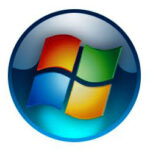
A. Start icon
B. Taskbar icon
C. Desktop icon
SECTION A – INFORMATION TECHNOLOGY EXAM
INSTRUCTION – Answer all the questions.
1. What is booting?
2. State 2 type of booting.
3. What is the different between cold and warm booting?
4. Mention 3 features of desktop.
5. Draw a start icon.
THIRD TERM INFORMATION TECHNOLOGY (COMPUTER STUDIES) EXAMINATION PRIMARY 1 (BASIC 1) – ANSWER KEYS
SECTION A – Objectives
1. A (Booting)
2. C (2)
3. B (Hot booting)
4. C (Cold booting)
5. A (Warm booting)
6. A (desktop)
7. B (Screensaver and theme)
8. B (Wallpaper)
9. B (static image)
10. A (moving image)
11. B (lower right corner)
12. C (bottom of the screen)
13. B (Icon)
14. A (Wallpaper)
15. A (Start icon) (based on common exam pattern)
SECTION B – Theory
1. What is Booting? Booting is the process of starting or turning on a computer system.
2. State 2 Types of Booting
- Cold booting
- Warm booting
3. Difference Between Cold and Warm Booting
- Cold booting: Starting the computer from off state.
- Warm booting: Restarting the computer while it is already on.
4. Three Features of Desktop
- Icons
- Taskbar
- Wallpaper
5. Draw a Start Icon
Note: Click the yellow “Next” button to proceed to the next question, or use the blue link provided.

Third Term Examination Kindergarten (Age 5) Term 3 Exam Questions for All the Subjects
Primary 2 (Basic 2) Third Term Examination for All Subjects and Answer keys

Third Term Examination Nursery 2 (Age 4) Term 3 Exam Questions for All the Subjects
About The Author

Alabi M. S.
Michael is a Principal Education Officer at LASUBEB with over 15 years of experience in teaching and learning. He is passionate about developing plan lesson notes and promoting quality assurance in education. Michael strongly believes that teachers inspire the future and play a vital role in shaping the next generation.